AI PDF scan in SharePoint: from contract PDF to registered contract with Azure AI and Shareflex

Registering a new contract in a contract management system is mostly typing: title, partner, start date, renewal type, notice period, owner, payment terms. The information is all in the PDF, but someone has to read it and put it into the right fields, in the right site. For a Benelux customer we built an AI PDF scan into their SharePoint contract management module on Shareflex: drop a signed contract PDF in a library, and a few moments later the metadata is extracted, matched and ready for review.

In this post we show how we built it, with real TypeScript code from the project, and – more importantly – the design choices that make it reliable enough to use on real contracts.
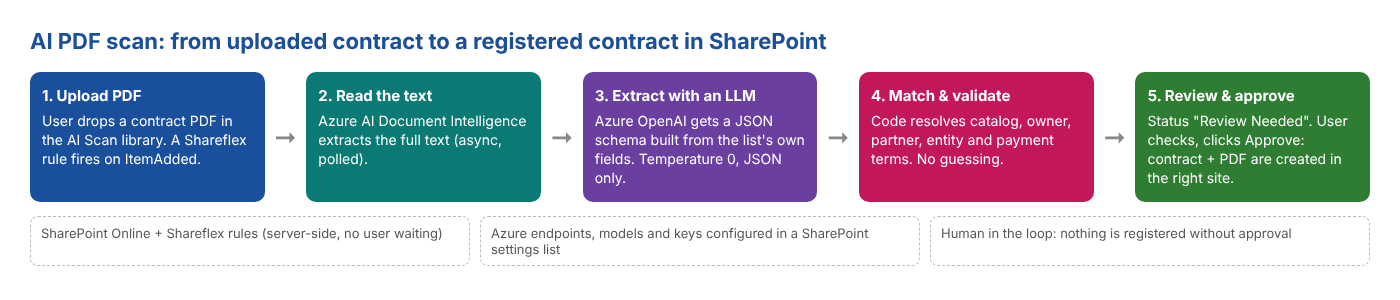
AI PDF scan flow: upload PDF, Azure AI Document Intelligence, Azure OpenAI extraction, matching and validation, review and approve in SharePoint
The AI PDF scan in five steps – all server-side, with a human approving the result.

Step 1 – A rule that reacts to the upload

The scan runs as a Shareflex rule (a server-side event receiver), not in the browser. The user uploads the PDF and can close the page; the rule does the work. The same rule handles three events: a new upload, a rescan request and an approval.

async function main() {
  const trigger = await rules.getItemById({
    listUrl: rules.Event.listUrl,
    itemId: rules.Event.itemId,
    fields: ['FSObjType', 'AIRescanRequested', 'Approved'],
  });
  const isRescanRequested = trigger?.AIRescanRequested === true || String(trigger?.AIRescanRequested ?? '') === '1';
  const isApproved = trigger?.Approved === true || String(trigger?.Approved ?? '') === '1';

  if (rules.Event.type === 'ItemAdded' && String(trigger?.FSObjType ?? '') === '0') {
    await runScan();          // new PDF uploaded
  } else if (rules.Event.type === 'ItemUpdated' && isRescanRequested) {
    await runScan();          // user asked for a rescan
  } else if (rules.Event.type === 'ItemUpdated' && isApproved) {
    await runApprove();       // user approved the result
  }
}

All endpoints, model names, keys and the prompt itself live in an AI PDF Scan Settings list in SharePoint. Switching to a newer model or tuning the prompt is a configuration change, not a deployment.

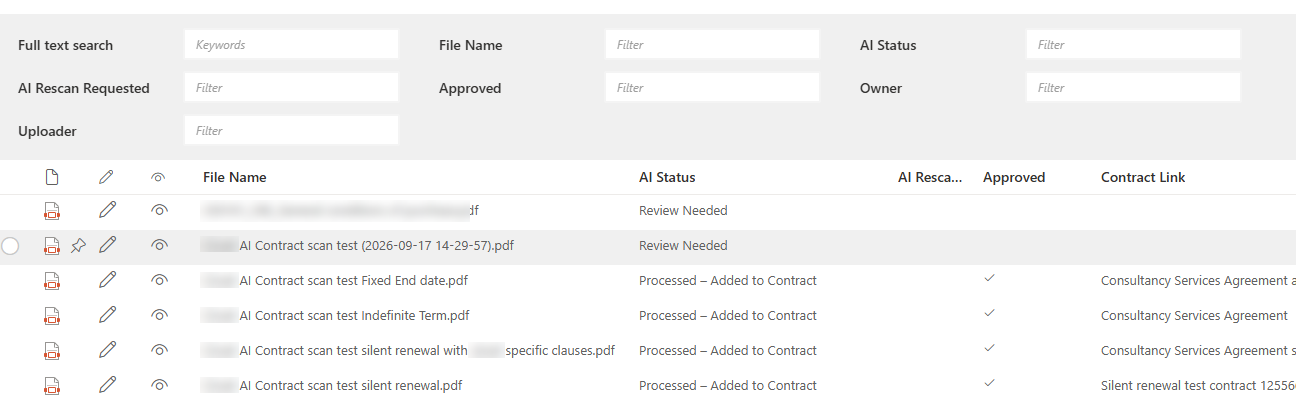
The AI Scan library: every uploaded PDF with its AI status, approval and a link to the contract it created.

Step 2 – Read the PDF with Azure AI Document Intelligence

An LLM is good at understanding text, but a PDF is not text: it can be a scan, have columns, headers, tables and signatures. So the first step sends the file to Azure AI Document Intelligence, which returns clean text. The analysis is asynchronous, so we submit and then poll.

const submitResponse = await rules.httpService({
  connectionId: connection.id,
  url: `${hostUrl}/documentintelligence/documentModels/${encodeURIComponent(modelId)}:analyze`
     + `?api-version=${encodeURIComponent(apiVersion)}`,
  method: 'POST',
  headers: { 'Content-Type': 'application/json' },
  body: JSON.stringify({ base64Source: base64Content }),
  timeoutInSeconds: 120,
});
const operationLocation = String(submitResponse.headers?.['operation-location'] ?? '').trim();

// Poll for completion - Document Intelligence analysis is asynchronous.
for (let attempt = 1; attempt <= 30; attempt++) {
  await rules.Utils.sleep(2000);
  const pollResponse = await rules.httpService({ connectionId: connection.id, url: operationLocation, method: 'GET' });
  const pollBody = typeof pollResponse.body === 'string' ? tryParseJson(pollResponse.body) : pollResponse.body;
  const status = String(pollBody?.status ?? '').trim().toLowerCase();
  if (status === 'succeeded') return String(pollBody?.analyzeResult?.content ?? '').trim();
  if (status === 'failed') throw new Error(`Document Intelligence analysis failed: ${formatApiErrorBody(pollBody?.error ?? pollBody)}`);
}

Step 3 – Let SharePoint define what the AI should extract

This is the heart of the approach. We do not hardcode a list of fields in the prompt. The rule reads the fields of the AI Scan list itself and builds a JSON schema from them: text fields become strings, choice fields become enums with their real choices, dates must be ISO 8601. Add a column to the list and the AI extracts it on the next scan.

async function buildExtractionSchema(): Promise<ExtractionSchema> {
  const listFields = await rules.getListFields({
    listUrl: rules.Event.listUrl,
    filter: 'Hidden eq false and ReadOnlyField eq false',
    select: 'InternalName,Title,TypeAsString,Choices',
  });
  const properties: Record<string, unknown> = {};
  const fields: SchemaField[] = [];   // same fields, kept for mapping the answer back
  for (const field of listFields) {
    const name = field.InternalName;
    if (!name || EXCLUDED_FROM_SCHEMA.has(name)) continue;
    const description = CUSTOM_SCHEMA_DESCRIPTIONS[name] ?? field.Title;
    switch (field.TypeAsString) {
      case 'Text': case 'Note':
        properties[name] = { type: 'string', description }; break;
      case 'Number': case 'Currency':
        properties[name] = { type: 'number', description }; break;
      case 'DateTime':
        properties[name] = { type: 'string', format: 'date',
          description: `${field.Title} - ISO 8601 (YYYY-MM-DD), strictly - no other format allowed` }; break;
      case 'Choice':
        properties[name] = { type: 'string', enum: field.Choices, description }; break;
      case 'Boolean':
        properties[name] = { type: 'boolean', description }; break;
    }
  }
  // ...plus Country/Division/Sub-Division/Contract Type as enums generated from the contract catalog
  return { jsonSchema: { type: 'object', properties, additionalProperties: false }, fields };
}

We learned the hard way to filter strictly: a document library has dozens of system columns, and when those ended up in the schema the extraction quality dropped noticeably. A clean schema is a better prompt.

Where a field needs more guidance than its title, we add a description. For yes/no questions we ask for evidence first: the model must quote the sentence its answer is based on, or leave both out.

// Evidence first: a yes/no classification is only accepted together with the quote it is based on
const CUSTOM_SCHEMA_DESCRIPTIONS: Record<string, string> = {
  DpaPresentRaw: 'REQUIRED whenever DpaPresentMatched is included in your response: quote the exact sentence(s) '
    + 'stating whether a Data Processing Agreement or GDPR/data-processing clause is present. '
    + 'Omit both DpaPresentRaw and DpaPresentMatched together if nothing relevant is stated.',
  DpaPresentMatched: 'Whether the document includes a Data Processing Agreement or a GDPR/data-processing clause - '
    + 'based on the quote you put in DpaPresentRaw. Include this field ONLY together with DpaPresentRaw.',
  SubDivisionMatched: 'Only applicable when Division is HR or Operations - omit otherwise.',
  // ...
};

Step 4 – Ask Azure OpenAI for JSON only

The extracted text goes to an Azure OpenAI deployment, with the schema in the system prompt and temperature 0 for consistent output. If the answer is not valid JSON, the rule gives the model one more chance with an explicit correction.

const systemPrompt = `${promptInstructions}\n\nRespond with ONLY a single JSON object matching this JSON schema, `
  + `no markdown formatting, no commentary:\n${JSON.stringify(schema.jsonSchema)}`;

for (let attempt = 1; attempt <= 2; attempt++) {
  const messages = attempt === 1
    ? [{ role: 'system', content: systemPrompt }, { role: 'user', content: documentText }]
    : [{ role: 'system', content: systemPrompt }, { role: 'user', content: documentText },
       { role: 'assistant', content: lastRawContent },
       { role: 'user', content: 'That response was not valid JSON matching the schema. Respond again with ONLY the JSON object, nothing else.' }];

  const response = await rules.httpService({
    connectionId: connection.id,
    url: `${hostUrl}/openai/deployments/${encodeURIComponent(deploymentName)}/chat/completions`
       + `?api-version=${encodeURIComponent(apiVersion)}`,
    method: 'POST',
    body: JSON.stringify({ messages, temperature: 0 }),
    timeoutInSeconds: 120,
  });
  // ...strip a possible ```json fence, JSON.parse, return on success
}

Every value that comes back is checked against its field: a choice that does not exist is skipped, a number must be a number, a date must be a real ISO date. Nothing is written blindly.

Step 5 – Match, never guess

Some values are not free text but references: the country, division and contract type determine which site the contract will live in; the owner must be a real user; the partner, legal entity and payment terms are lookups into master data. The AI classifies, but code does the matching, and only on an exact match. If the combination does not exist, the field stays empty and the user picks it.

// Never fuzzy-match: this decides which division's site the contract lands in
const matches = await rules.getItems({
  listUrl: catalogListUrl,
  fields: ['ID', 'Country', 'Division', 'SubDivision', 'ContractType'],
  filter: [
    `Country eq '${escape(country)}'`,
    `Division eq '${escape(division)}'`,
    `SubDivision eq '${escape(subDivision)}'`,
    `ContractType eq '${escape(contractType)}'`,
  ].join(' and '),
  rowLimit: 1,
});
const match = matches[0];
if (!match) {
  logWarning(`LLM-classified combination "${country} > ${division} > ${subDivision} > ${contractType}" `
    + `was not found in AIContractCatalog; left empty for manual selection.`);
  return {};
}
const id = String(match.ID);
return {
  CountryMatched: `${id};#${match.Country}`,
  DivisionMatched: `${id};#${match.Division}`,
  SubDivisionMatched: `${id};#${match.SubDivision}`,
  ContractTypeMatched: `${id};#${match.ContractType}`,
};

The same principle applies to the contract owner: the extracted name is matched against the site users, and with zero or several matches the field is left empty. An empty field is better than a wrong one.

Step 6 – Human review and one-click approval

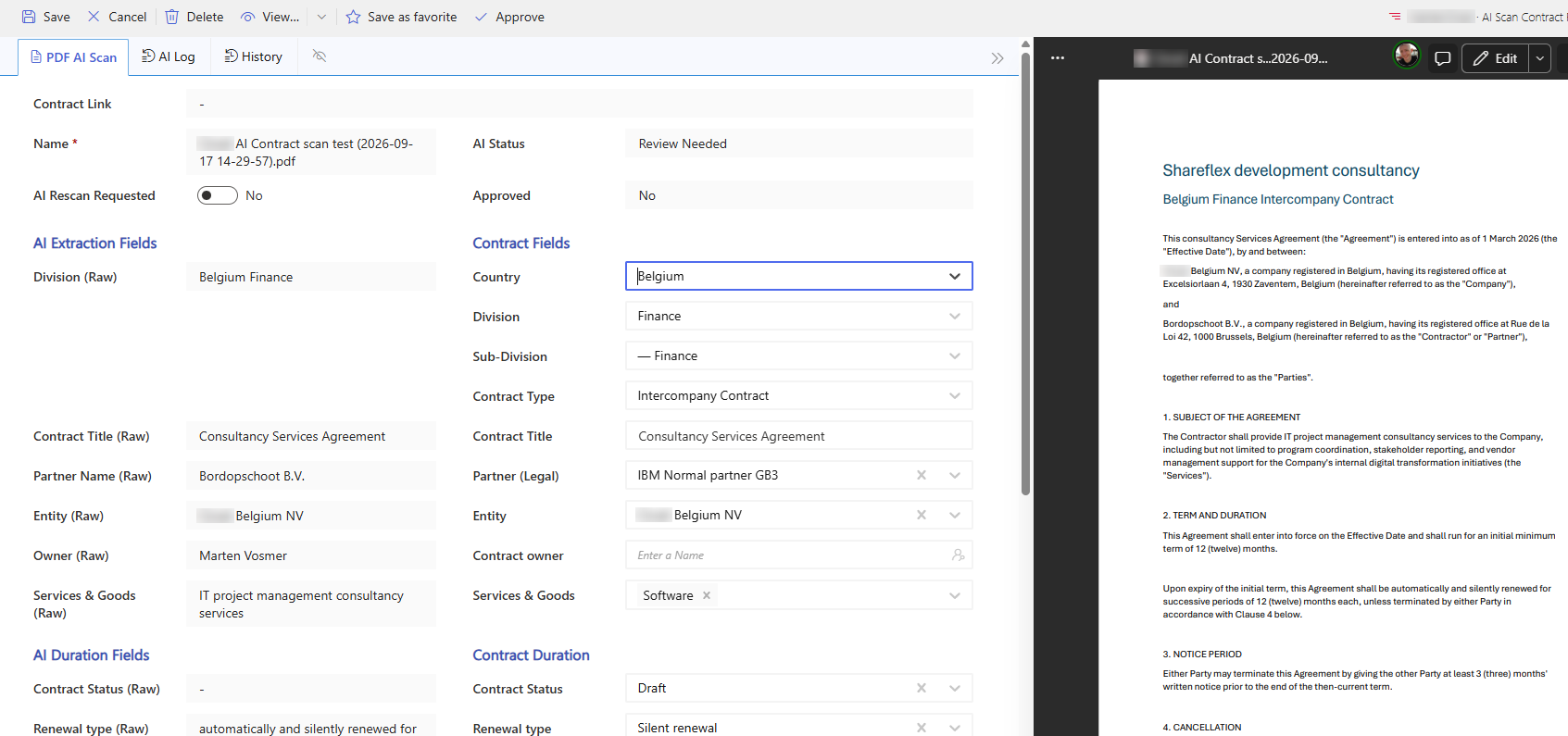
After the scan the item gets the status Review Needed. The review form shows the raw extracted text next to the matched values, with the PDF preview open in the side pane. Country, division, sub-division and contract type are cascading dropdowns, so only combinations that really exist can be chosen:

const contractCatalogSet = SF.createCascadingSet({
  key: 'AIContractCatalogCascade',
  autoFill: true,
  steps: [
    { field: 'CountryMatched',      lookupField: 'Country',      listUrl: AI_CONTRACT_CATALOG_LIST_URL },
    { field: 'DivisionMatched',     lookupField: 'Division',     refField: 'Country',     listUrl: AI_CONTRACT_CATALOG_LIST_URL },
    { field: 'SubDivisionMatched',  lookupField: 'SubDivision',  refField: 'Division',    listUrl: AI_CONTRACT_CATALOG_LIST_URL },
    { field: 'ContractTypeMatched', lookupField: 'ContractType', refField: 'SubDivision', listUrl: AI_CONTRACT_CATALOG_LIST_URL },
  ],
});
The review form: raw extracted values on the left, matched contract fields on the right, PDF preview alongside.
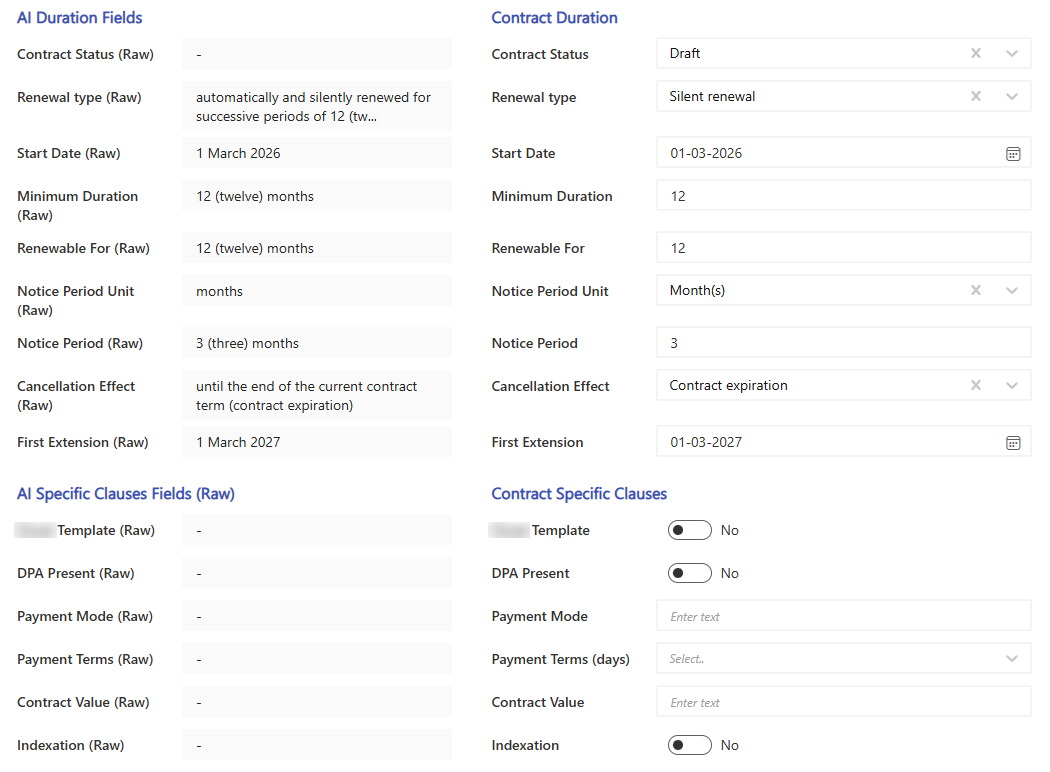
Duration fields: the raw text from the contract next to the clean values (dates, numbers, choices) derived from it.

When everything is correct, the user clicks Approve. The rule then checks for a duplicate title, creates the real contract in the right contract site and copies the PDF into its Documents library:

const contractFields = rules.createItemFields()
  .setText('ContractId', contractId)
  .setText('Title', contractTitle)
  .setText('ContractType', contractTypeName)
  .setText('ContractStatus', contractStatus)
  .setText('Country', hierarchy[0])
  .setText('Division', divisionValue)
  .setUser('Owners', [ownerLoginName]);

if (item?.StartDateMatched) contractFields.setDate('StartDate', new Date(String(item.StartDateMatched)));
if (item?.NoticePeriodUnitMatched) contractFields.setChoice('NoticePeriodUnit', String(item.NoticePeriodUnitMatched));
if (partnerItemId) contractFields.setLookup(partnerLookupFieldName, [partnerItemId]);
// ...more fields

const newContractItemId = await rules.createItem({ listUrl: contractsListUrl, fields: contractFields, eventsActivated: true });

// Then copy the scanned PDF into the new contract's folder in Documents
await rules.createFile({
  listUrl: documentsListUrl, fileName, content: base64Encode(fileBytes),
  folderPath: contractId, ensureFolderPath: true, encoding: 'Base64', overwrite: true,
});

The scan item keeps a link to the new contract and a full AI log of every step, so anyone can see what the AI extracted and what happened afterwards.

Built to fail safely

Every outcome has its own status, so nothing gets stuck silently: Scanning In Progress, Review Needed, Pending Contract Registration, Processed – Added to Contract, and for problems Failed, Scan Problem, Duplicate Contract Error, Contract Generation Error or Document Copy Error. Failures are written to the item’s AI log and can be e-mailed to the people in the settings list. A rescan is one checkbox away.

What it delivers

  • Minutes instead of a quarter of an hour per contract: the user reviews instead of types.
  • Consistent metadata: choices, dates and lookups are validated before they are saved.
  • The right place: the contract lands in the correct country, division and contract type site.
  • Transparent AI: raw extracted text, quotes as evidence and a full log per document.
  • Human in control: nothing is registered without approval.
  • Future-proof: new fields, models or prompts are configuration, not code.

Lessons learned

  • Separate reading (Document Intelligence) from understanding (LLM).
  • Generate the schema from SharePoint, and keep it clean.
  • Let the AI classify, but let code match against real data – exactly, never fuzzy.
  • Ask for the quote, not just the answer.
  • Design for failure: a clear status and log beat a silent error.

Want AI in your contract process?

The AI PDF scan is part of the contract management work we do on Shareflex Contract. Also see our Shareflex Contract AI services, or read how we built a safe Copy Contract feature in the same module. Get in touch for a demo.