
Copying a contract sounds trivial: select it, click copy, done. In practice, on SharePoint contract management it is anything but. Contracts live in different sites per country, division and contract type, they carry dozens of metadata fields and people fields, and they come with documents and rights & obligations attached. A naive copy either breaks, silently loses data, or creates a mess nobody can clean up.
For a Benelux customer we built a contract management module from scratch on the Shareflex platform, in TypeScript. One of the features users love most is Copy Contract. In this post we show how it works, the approach behind it, and real code from the project.
Why users want to copy contracts
- A new supplier contract often looks 90% like an existing one: same partner, same owner, same clauses.
- A contract sometimes has to move to a different contract type, for example from a lease contract to a supplier contract.
- Retyping metadata is slow and the number one source of errors in a contract register.
So the requirement was: copy a contract, optionally with its documents and rights & obligations, to any contract type in the organisation. Safely, traceably and reversibly.
The Copy Contract dialog
From any saved contract the user clicks Copy Contract… in the form toolbar. A dialog opens with three columns: the input on the left, validation in the middle and a live copy log on the right.
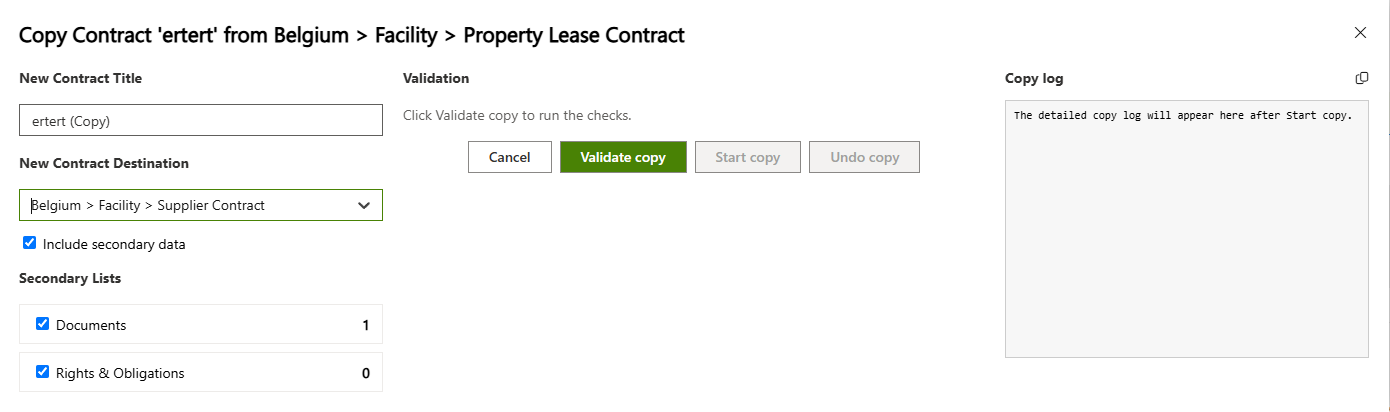
The user picks a new title (pre-filled as “… (Copy)”), a destination from a list of every contract web in the organisation, and whether to include secondary data. The counts next to Documents and Rights & Obligations show at a glance what will be copied.
Step 1 – Validate before you copy
The most important design decision: Start copy is disabled until validation has passed, and validation is tied to the exact input. Change the title or the destination and the validation is invalidated automatically.
const currentInputKey = JSON.stringify({
  newContractTitle,
  selectedTarget: selectedTarget.map(option => option.key),
  includeDocuments,
  includeRightsAndObligations,
});

// Start copy is only enabled for the exact input that passed validation
const canStartCopy = validatedInputKey === currentInputKey
  && validationResults.length > 0
  && validationResults.every(result => result.level !== 'error');

const invalidateValidation = () => {
  setValidatedInputKey('');
  if (validationResults.length > 0) setValidationResults([
    { level: 'info', text: 'Input changed. Run validation again before starting the copy.' },
  ]);
};
The checks themselves run against the target site, with the permissions of the current user:
- Is the source contract saved?
- Is the new title filled in and not longer than 255 characters?
- Is exactly one destination selected?
- Can the user create items in the target Contracts list, and in every selected secondary list?
- Does a contract with the same title already exist in the target?
const checkTargetListAddPermission = async (webUrl: string, listUrl: string) => {
  const endpoint = `${webUrl}/_api/web/GetList(@listUrl)/EffectiveBasePermissions`
    + `?@listUrl='${encodeURIComponent(SF.urlUtil.makeServerRelative(listUrl))}'`;
  const permissions = await SF.request(endpoint, { headers: { 'Cache-Control': 'no-cache' } });
  return SF.parseItemPermissions(permissions).hasAddListItemsPermission();
};

// Duplicate title check in the target contract web
const duplicates = await SF.getListDataService().getAllPages(target.webUrl, null, targetContractsListUrl, {
  viewFields: ['ID'],
  innerWhereCaml: SF.camlUtil.camlEq('Title', trimmedTitle),
});
results.push(duplicates.length > 0
  ? { level: 'error', text: `A contract with this title already exists in ${target.text}.` }
  : { level: 'pass',  text: `No existing contract with this title found in ${target.text}.` });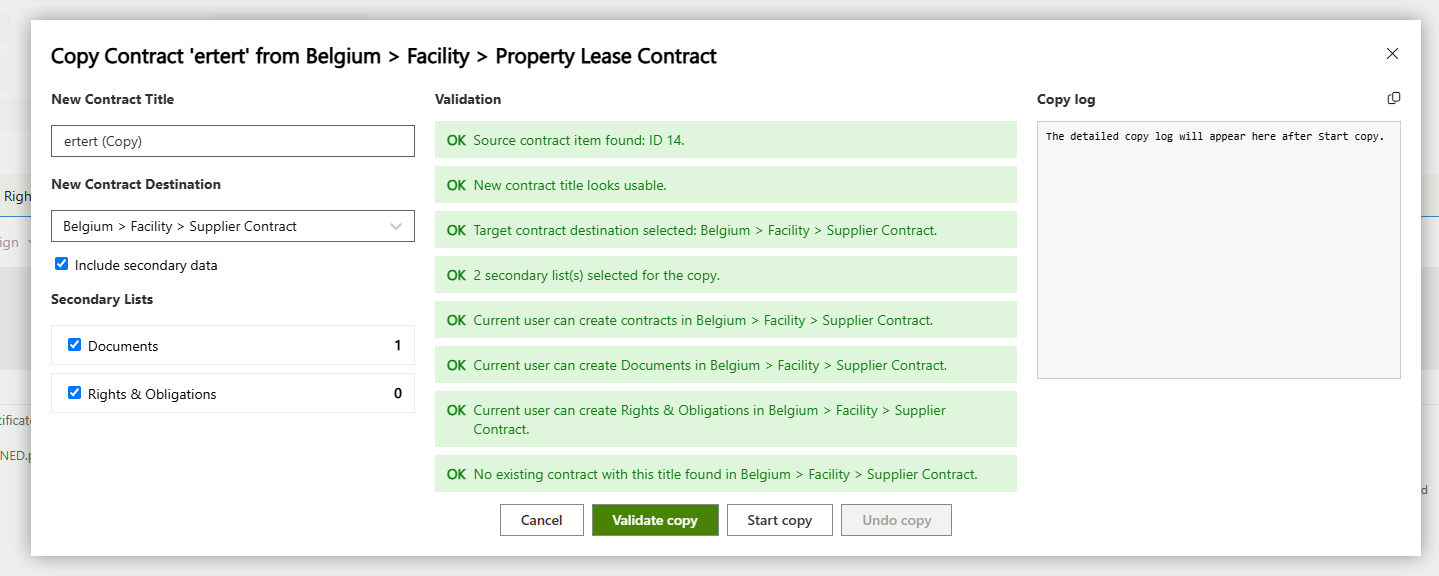
Every result has a level (pass, error, warning or info), so the user sees exactly why a copy cannot start, instead of an error halfway through.
Step 2 – Copy fields generically, not with a whitelist
The first instinct is a hardcoded list of fields to copy. That list is outdated the moment someone adds a column. Instead we ask SharePoint which fields belong to the list itself: not hidden, not read-only, not inherited from the base type.
/**
 * Reads the internal names of a list's own (non-system, non-computed) fields, so the copy does not
 * depend on a hardcoded, easily-outdated field whitelist.
 */
async function getCopyableFieldNames(SF: any, webUrl: string, listTitle: string, excludedFieldNames: Set<string>) {
  const endpoint = `${webUrl}/_api/web/lists/getbytitle('${listTitle}')/fields`
    + `?$select=InternalName,Hidden,ReadOnlyField,FromBaseType,TypeAsString`
    + `&$filter=Hidden eq false and ReadOnlyField eq false and FromBaseType eq false`;
  const response = await SF.request(endpoint, { headers: { Accept: 'application/json;odata=nometadata' } });
  const rawFields = Array.isArray(response) ? response : response?.value ?? [];
  const eligibleFields = rawFields.filter(field =>
    !excludedFieldNames.has(field.InternalName) && !field.InternalName.startsWith('_'));
  const isUserField = field => field.TypeAsString === 'User' || field.TypeAsString === 'UserMulti';
  return {
    genericFieldNames: eligibleFields.filter(field => !isUserField(field)).map(field => field.InternalName),
    userFieldNames: eligibleFields.filter(isUserField).map(field => field.InternalName),
  };
}
People fields are the exception. Their read format cannot be written back as-is, so they are read separately with $expand and re-serialized into the format the people picker expects:
// People fields: read {Name, Title, EMail} and re-serialize to the picker format
const normalized = users
  .map(user => ({
    Key: user.Name || user.EMail || user.Title || '',
    DisplayText: user.Title || user.EMail || user.Name || '',
    IsResolved: true,
  }))
  .filter(user => user.Key !== '');
if (normalized.length > 0) result[fieldName] = JSON.stringify(normalized);
Then the target contract is created with a fresh contract ID and the contract type of the destination:
const { genericFieldNames, userFieldNames } = await getCopyableFieldNames(
  SF, sourceWebUrl, 'Contracts',
  new Set(['ContentType', 'Attachments', 'ContractId', 'Title', 'ContractType']));

// ...read the source item, serialize every copyable field...
Object.assign(createFields, await fetchPeopleFieldValues(SF, sourceWebUrl, sourceListUrl, sourceItemId, userFieldNames));
createFields.Title = trimmedTitle;
createFields.ContractId = SF.makePrimaryId('####-####');   // a fresh contract ID
createFields.ContractType = target.contractTypeName;          // the target's contract type

appendCopyLogEntry('info', 'Creating target contract...');
const createResponse = await SF.getListDataService()
  .createItem(target.webUrl, null, targetContractsListUrl, createFields, targetFolderPath, true, false, false);
Step 3 – Copy documents with SP.MoveCopyUtil
Documents are real files, so we use SharePoint’s server-side copy, SP.MoveCopyUtil.CopyFileByPath. The file is never downloaded to the browser, version-safe options are set, and the copy works across sites. One catch we hit: unlike a normal item create, CopyFileByPath does not create the destination folder, so we ensure it first.
// CopyFileByPath does not create its destination folder itself,
// so the per-contract folder is ensured explicitly first.
await SF.request(`${targetWebUrl}/_api/web/folders`, {
  method: 'POST',
  headers: { Accept: 'application/json;odata=nometadata', 'Content-Type': 'application/json;odata=nometadata' },
  body: JSON.stringify({ ServerRelativeUrl: targetFolderPath }),
});

await SF.request(`${targetWebUrl}/_api/SP.MoveCopyUtil.CopyFileByPath()`, {
  method: 'POST',
  headers: { Accept: 'application/json;odata=nometadata', 'Content-Type': 'application/json;odata=nometadata' },
  body: JSON.stringify({
    srcPath:  { DecodedUrl: sourceFileUrl },
    destPath: { DecodedUrl: targetFileUrl },
    options:  { KeepBoth: true, ResetAuthorAndCreatedOnCopy: true, ShouldBypassSharedLocks: true },
  }),
});
// ...then re-link the copied document to the new contract and copy its metadata
await SF.getListDataService().updateItem(targetWebUrl, null, targetListUrl, copiedItemId, fields);
Rights & obligations are copied item by item in the same way, each one linked to the new contract.
Step 4 – A live log and an audit trail
While the copy runs the user sees a timestamped log, newest first, and can copy it to the clipboard for support. As soon as the new contract exists, a link appears to open it.
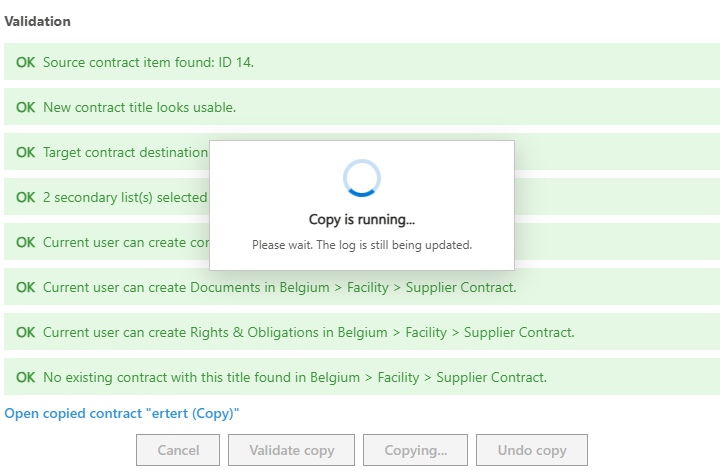
Every copy attempt is also written to a central ContractCopyLog list in the root site: who copied what, from where to where, and the status (Primary created, Completed, Failed, Undone) together with the complete log. Contract managers can always trace where a contract came from.
Step 5 – Undo, safely
Mistakes happen. The Undo copy button removes the copy again, but never with a hard delete: the copied secondary items and then the contract are moved to the SharePoint recycle bin. The source contract is never touched.
const confirmed = window.confirm(
  `Undo copy?\n\nThis will move the copied contract "${copyResultLink.title}" (ID ${copyResultLink.itemId}) `
  + `from ${copyResultLink.webUrl} to the SharePoint recycle bin.\n\nThe source contract will not be changed.`);
if (!confirmed) return;

// Secondary items first, then the contract itself – always to the recycle bin, never a hard delete
for (const secondaryItem of copyResultLink.secondaryItems) {
  const recycleEndpoint = `${secondaryItem.webUrl}/_api/web/GetList(@listUrl)/items(@itemId)/Recycle()`
    + `?@listUrl='${encodeURIComponent(SF.urlUtil.makeServerRelative(secondaryItem.listUrl))}'`
    + `&@itemId='${encodeURIComponent(secondaryItem.itemId)}'`;
  await SF.request(recycleEndpoint, {
    method: 'POST',
    headers: { Accept: 'application/json;odata=nometadata', ...getDisableRulesEventHeaders() },
  });
}
// ...same call for the copied contract, then:
await updateContractCopyLogItem('Undone');
What it delivers
- Minutes instead of an hour per new contract that resembles an existing one.
- No data loss: new columns are copied automatically, people fields included.
- No surprises: permissions and duplicates are checked before anything is written.
- Full traceability: every copy attempt is in the ContractCopyLog.
- Safe to try: undo goes to the recycle bin and the source stays untouched.
Lessons learned
- Validate against the target with the user’s own permissions, not against assumptions.
- Let SharePoint tell you which fields exist; avoid whitelists.
- Write the primary item first and log every step, so a failure halfway is always visible and recoverable.
- Use SharePoint’s own server-side APIs for files, and know their quirks (folders!).
Want something like this?
Copy Contract is one example of what we build on top of Shareflex Contract and the Shareflex platform: modules tailored to your contract landscape, running inside your own Microsoft 365 tenant. Curious how Shareflex gets into your tenant in the first place? Read our guide on installing Shareflex on your SharePoint tenant. Get in touch and we’ll show you a demo.
