
Every contract management system can send a reminder before a notice period ends. Shareflex Contract does that too, and it is one of its most-used features. But a reminder is one-way: it tells someone to act, and then hopes they do. Nobody records the decision, and next year the same discussion starts again. With scheduled workflows in Shareflex Flow, the notice date itself starts a process that ends in a clear, recorded decision: cancel or extend.
The problem with reminders
Notice periods are not just information – they trigger decisions. In many organisations those decisions still depend on personal reminders: an e-mail that gets lost, a calendar entry of someone who left, or (we have seen it) a printed Excel list in a binder. The date is registered perfectly in the contract register, yet the contract silently renews for another year.
What is a scheduled workflow?
Normally a workflow in Shareflex Flow starts when a user clicks a button, or when a status or combination of metadata is saved. A scheduled workflow starts on a business-relevant date instead. You configure three things once, and they apply to every contract:
- The start date – a date field on the contract, for example 14 days before the notice date.
- The start condition – for example: status is “valid” and the notice date has not been handled before.
- The workflow – the steps, rules, actions and tasks that follow.
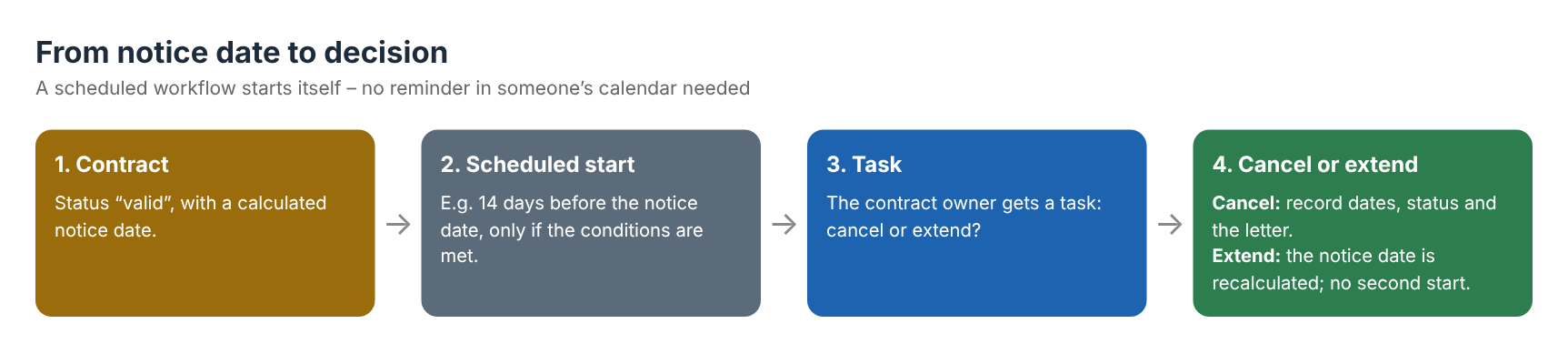
Example: “contract review and decision”
- Start – two weeks before the notice date the workflow starts by itself.
- Review – the contract owner receives a task with the contract, its values and its history in one place.
- Cancel – the owner records “cancelled on” and “cancelled per”, the status changes and, if wanted, a cancellation letter is generated from a template.
- Extend – the current notice date is stored as the previous one. The nightly job then calculates the next notice date, and the same workflow will not start twice for the same period.
Why this makes a difference
- Proactive instead of reactive – the process starts before the deadline, not after someone checks a list.
- Context instead of an e-mail – the task, the contract and the decision stay linked.
- One rule for all contracts – configured once, applied to every contract of that type.
- Audit trail – workflow history shows who decided what and when; useful for audits and for the next renewal.
- Automation behind the scenes – a workflow action can set field values or start custom business logic.
Not only for contracts
The same pattern works for every date that should lead to action: the review date of a quality document, the expiry of a supplier certificate, a yearly audit, or a recurring obligation in a contract. Wherever a date is stored, a process can start.
Frequently asked questions
Can SharePoint remind me before a contract notice period ends?
SharePoint itself has no contract logic. Shareflex Contract adds a contract register on top of SharePoint with calculated notice dates, notifications and – with scheduled workflows – a task that asks the owner to decide before the deadline.
What is the difference between a notification and a scheduled workflow?
A notification only informs. A scheduled workflow creates a task with a decision (cancel or extend), records the result and updates the contract, so the outcome is traceable.
Can the workflow start more than once for the same contract?
No. When a contract is extended, the current notice date is stored as the previous one and the next date is recalculated, so the start condition is not met again for the same period.
Does this work for other documents than contracts?
Yes. Any date on a Shareflex item can start a workflow, for example document reviews in document control or certificate expiry dates of suppliers.
Never miss a notice period again
Want to see a scheduled renewal workflow in your own contract register? Have a look at Shareflex contract management software for SharePoint or read how we built sales and purchase contract management in SharePoint.
