
In a group with several countries and divisions, contract management in SharePoint has to do two things at once: give management, legal and finance one place for all contracts, and make sure a sales manager in the Netherlands does not see the HR contracts in Belgium. In Shareflex Contract we solve this with a clear structure per country and division, a permission module that links groups to that structure, and overviews that only show each user his own contracts.
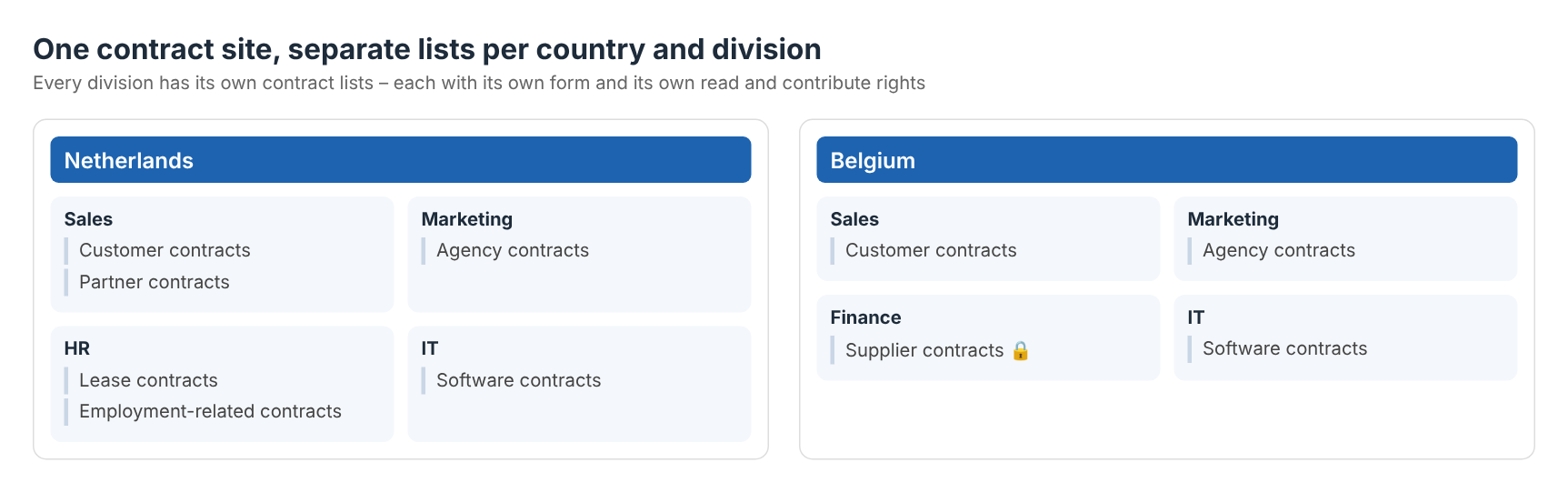
The structure: country, division, sub-division, contract list
Every contract lives in a contract list that belongs to a place in the organisation: country › division › (sub-division) › contract type. Sales in the Netherlands has customer and partner contracts, Marketing has agency contracts, HR has lease and freelance contracts, Finance has financing contracts. Each list can have its own form, field choices and workflow – a lease contract asks for other data than a customer contract.
Because every list sits in a fixed place in the structure, permissions can be set per list: who may read and who may contribute. Lists marked as confidential – for example financing, intercompany or management contracts – are only open to a small group.
All contracts and All documents: one overview, each user his own
Users don’t want to click through ten lists to find a contract. That is why Shareflex Contract has two central overviews:
- All contracts – every contract from every contract list in one view, with search, filters and the key fields: counterparty, start and end date, notice period, value, owner.
- All documents – every contract document, amendment and attachment across all lists in one place.
The important part: these overviews respect the permissions of the underlying lists. A sales user in the Netherlands sees only the Dutch Sales contracts and their documents; the rest simply does not exist for him. Legal or the CFO, who have rights on everything, see the whole portfolio in the same view. One overview to build and maintain – and everyone automatically gets his own version of it.
The permission module: link a group to countries and divisions
Nobody wants to set SharePoint permissions list by list. In the Shareflex permission module, rights are managed per Microsoft Entra group: pick the group, then pick the permission roles – each role is a combination of country, division and level, for example “Netherlands Sales – Read” or “Belgium Sales – Contribute”. Shareflex applies the roles to all contract lists that belong to that country and division, including the All contracts and All documents overviews.
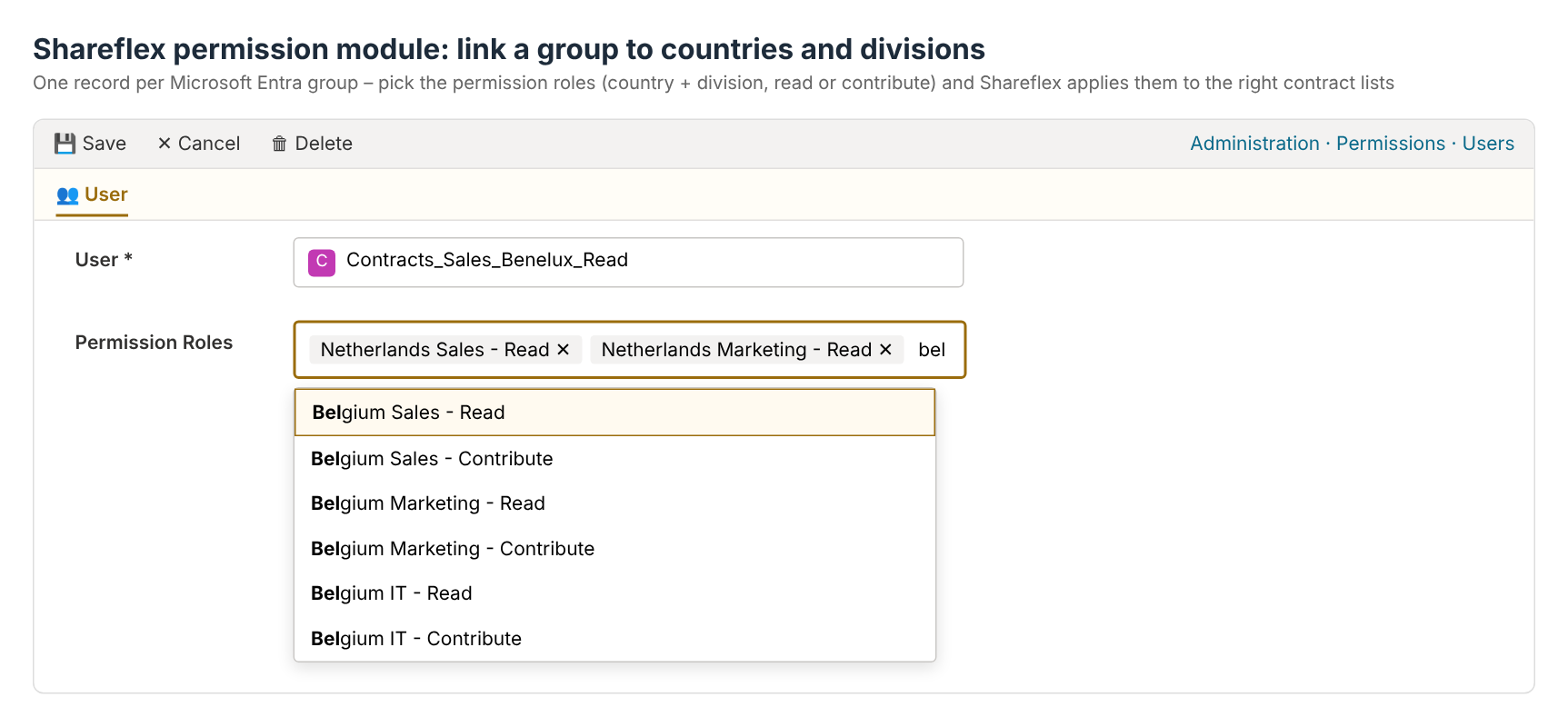
Joiners and leavers are handled where they belong: in the Entra group, by IT. A new employee in Sales Belgium is added to the group and immediately sees the right contracts – nothing to change in SharePoint.
Designed in Excel, built by provisioning
Before anything is built, we design the structure together with the business in one Excel workbook. Per country and division we agree:
- which divisions and sub-divisions exist;
- which contract lists each division needs, and which contract form each list uses (standard, lease, employment, …);
- field choices that differ per division, such as product groups or vehicle types;
- which lists are general and which are confidential;
- which group may read and which group may contribute;
- other deviations: an extra approval step, a different notification term, a specific workflow.
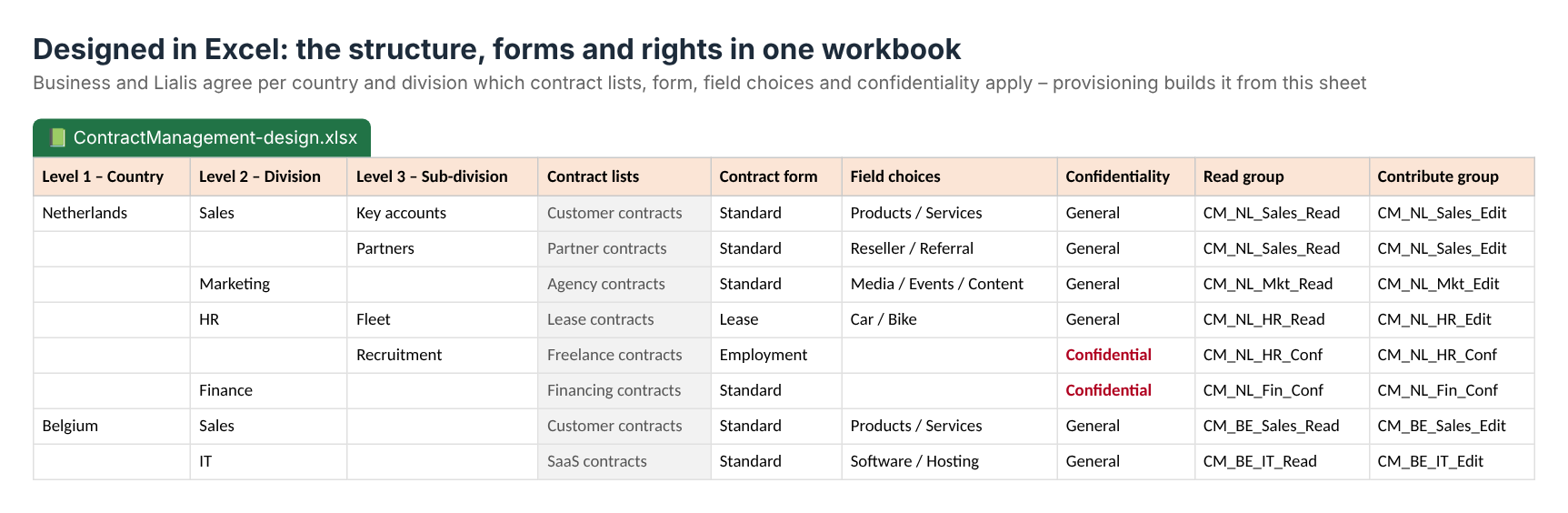
That workbook is the blueprint. With Shareflex provisioning scripts we generate the lists, forms, views and permissions straight from it – so what was agreed is exactly what is built. A new division or an extra country later is a new row in the workbook and a script run, not a new project. Read more about this approach in from customer needs to tailor-made contract management and Shareflex development with provisioning.
What management gets out of it
- One portfolio – all contracts of all countries and divisions in one SharePoint environment, with one way of working.
- Confidentiality by design – everyone sees exactly what he is allowed to see, also in the central overviews.
- Low maintenance – rights follow Entra groups; the structure follows the Excel design.
- Room to differ – each division can have its own form and choices without a separate system.
See also how this works for sales and purchase contracts in SharePoint and how we built a safe copy function between countries and divisions.
Frequently asked questions
Can I set contract permissions per division in SharePoint?
Yes. In Shareflex Contract every contract list belongs to a country and division, and read or contribute rights are set per list through permission roles linked to Microsoft Entra groups.
What does a user see in the All contracts overview?
Only the contracts from the lists he has rights to. Users with rights on all countries and divisions, such as legal or finance, see the complete portfolio in the same overview.
Do we have to manage SharePoint permissions manually?
No. You manage Entra groups and assign permission roles in the Shareflex permission module; Shareflex applies them to the right lists.
Can each division have its own contract form?
Yes. Per contract list we agree the form, field choices and workflow in the Excel design, and provisioning builds it.
One contract environment for your whole organisation?
Tell us how your countries and divisions are organised. We design the structure and rights with you and build it in contract management software for SharePoint. Book a demo.
