
Most organisations start contract management with the contracts they sell. Sooner or later the contracts they buy follow: hosting, software licences, office rent, consultants. Both need a reliable contract register, deadlines and reminders – but they are not the same thing. In this article we show how we built SharePoint contract management with Shareflex for a Dutch software group with several divisions and dozens of business lines: first an app for sales contracts, then a separate app for purchase contracts, on one shared foundation.
No code in this article, but the functional story: what did we build, why, and what are the differences between sales and purchase contract management?
One foundation, two contract management apps
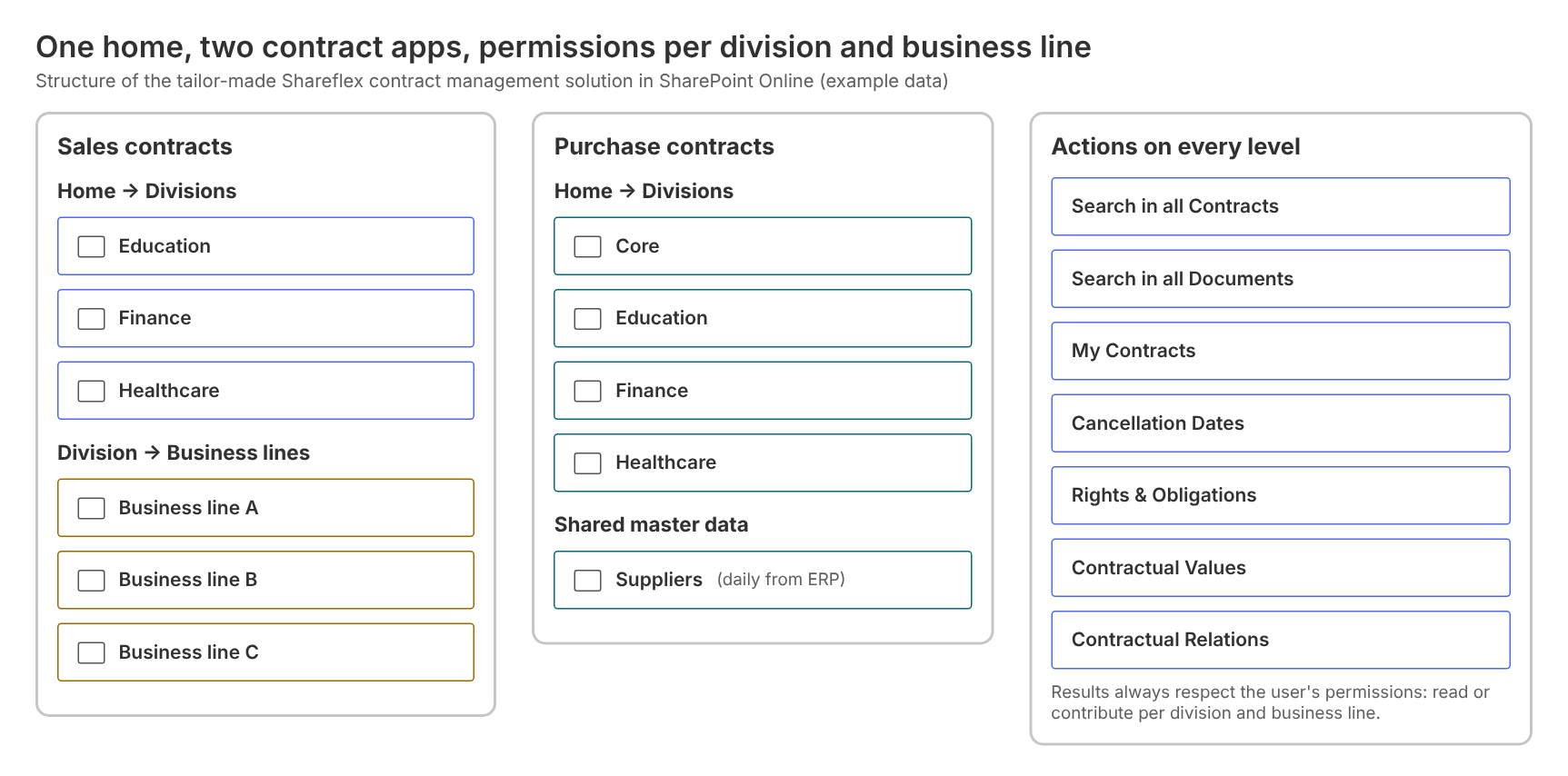
The customer wanted one place for all contracts, but with strict separation between divisions. Every division manages its own contracts, and within a division every business line has its own contract list. Above that sits a home page with the actions people use every day: search in all contracts, search in all documents, my contracts, cancellation dates, rights and obligations, contractual values and contractual relations.
Permissions are set per division and per business line, with read or contribute rights. Someone with rights for one business line can use the same search lists as everyone else, but only finds the contracts they are allowed to see. Test and production run in separate SharePoint sites; the test environment is clearly marked so nobody mistakes it for the real thing.
The sales contract form: built around the contract lifecycle
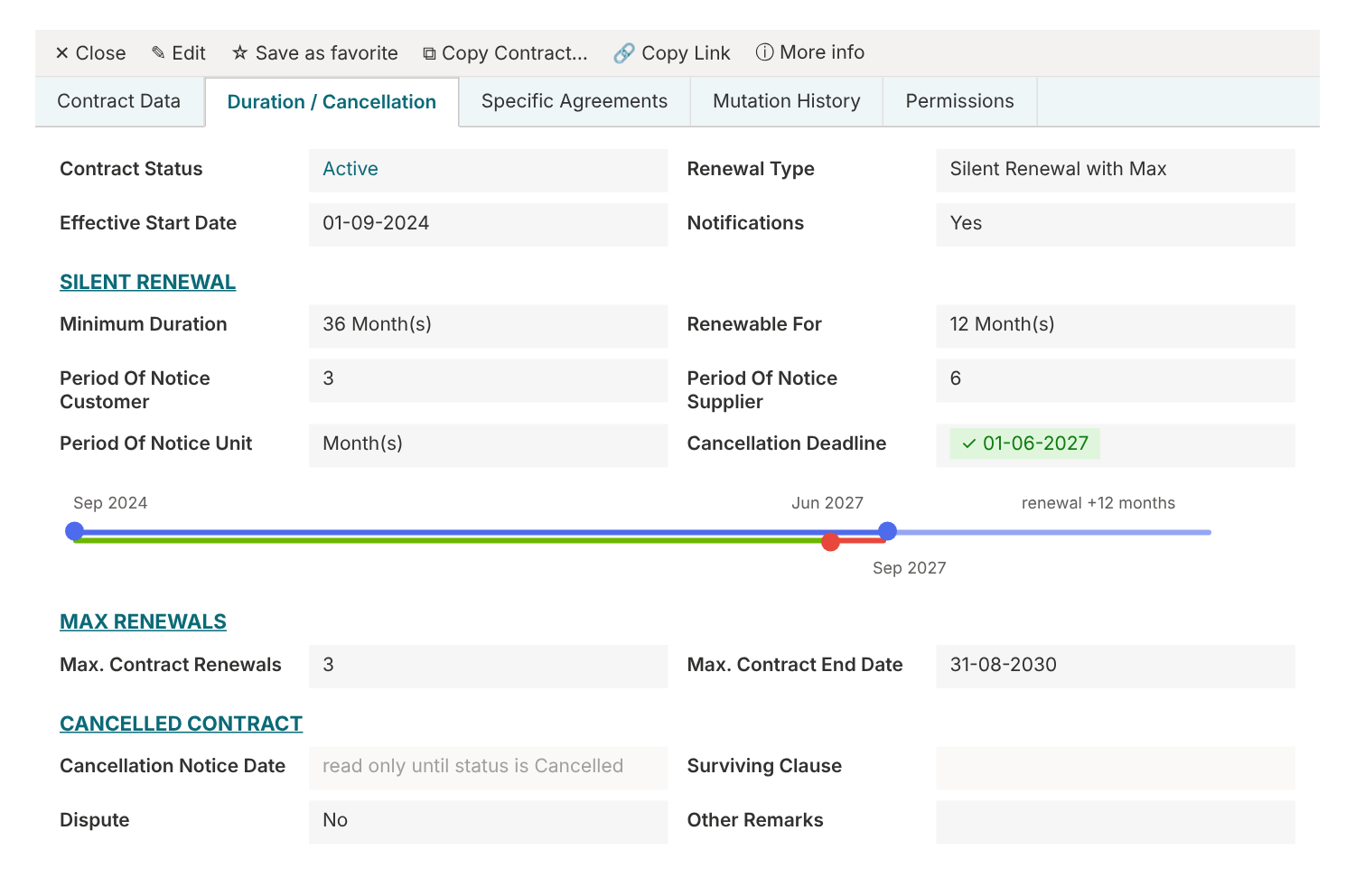
The sales contract form is organised in tabs that follow the contract lifecycle: Contract Data, Duration / Cancellation, Specific Agreements, Mutation History and Permissions. Below the form sit the related lists: contractual values, rights & obligations, documents, e-mails and relations.
The customer’s debtors, products and organisational data come from the ERP system every night. Debtors are filtered on the division where the contract is created, so a user in one division never has to scroll through the customers of another.
Duration, renewal and cancellation deadlines
The heart of any contract register is the question: when do we have to act? We introduced a renewal type that drives the whole tab:
- Fixed end date – only the end date can be entered, the rest is read-only.
- Silent renewal – minimum duration, renewal period and notice periods for both the customer and the own organisation. The cancellation deadline is calculated and shown on a timeline.
- Silent renewal with maximum – the same, plus a maximum number of renewals and a maximum contract end date.
The contract status decides which fields are mandatory. A concept contract can be saved with little information; an active contract needs the dates that drive the notifications; a cancelled contract opens the cancellation fields – notice date, surviving clauses and any dispute – and makes the rest read-only. That keeps the data clean without bothering users with fields that don’t apply.
Specific agreements
Contracts are more than dates. The Specific Agreements tab records the clauses management wants to find back quickly: who owns the intellectual property, liability, penalty and change-of-control clauses, which standards were agreed (such as ISO or ISAE 3402), and special price or invoice agreements. Small help texts tell the user what to do next, for example: “when standards are filled in, create a right/obligation of type Audit”.
Contractual values: what is the contract worth?
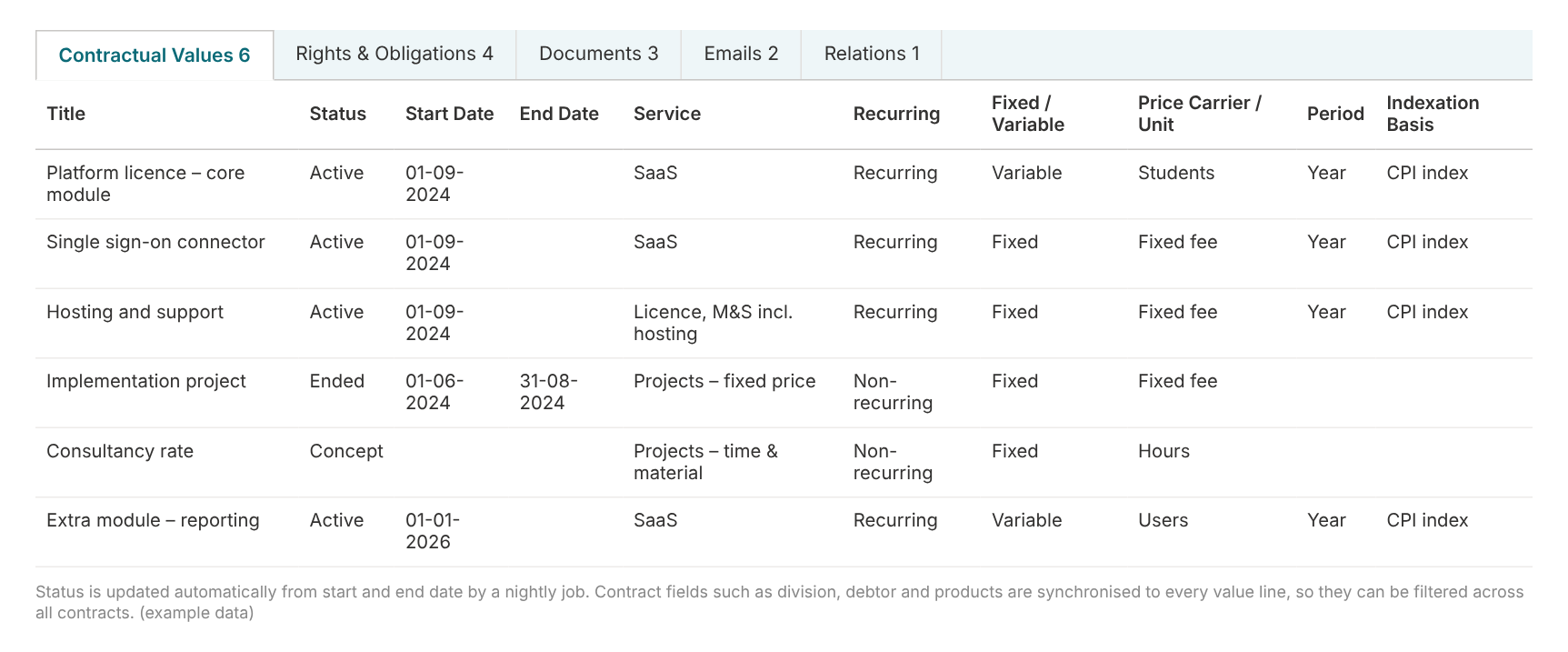
Every contract has a list of contractual values: recurring or one-off, fixed or variable, the price carrier (per student, per user, fixed fee, hours), the period and the indexation basis. A nightly job updates the status of each value line from its start and end date. Key contract fields – division, debtor, products, contract ID – are synchronised to every line, so finance can filter all values across all contracts without opening a single contract.
Rights and obligations that don’t get forgotten
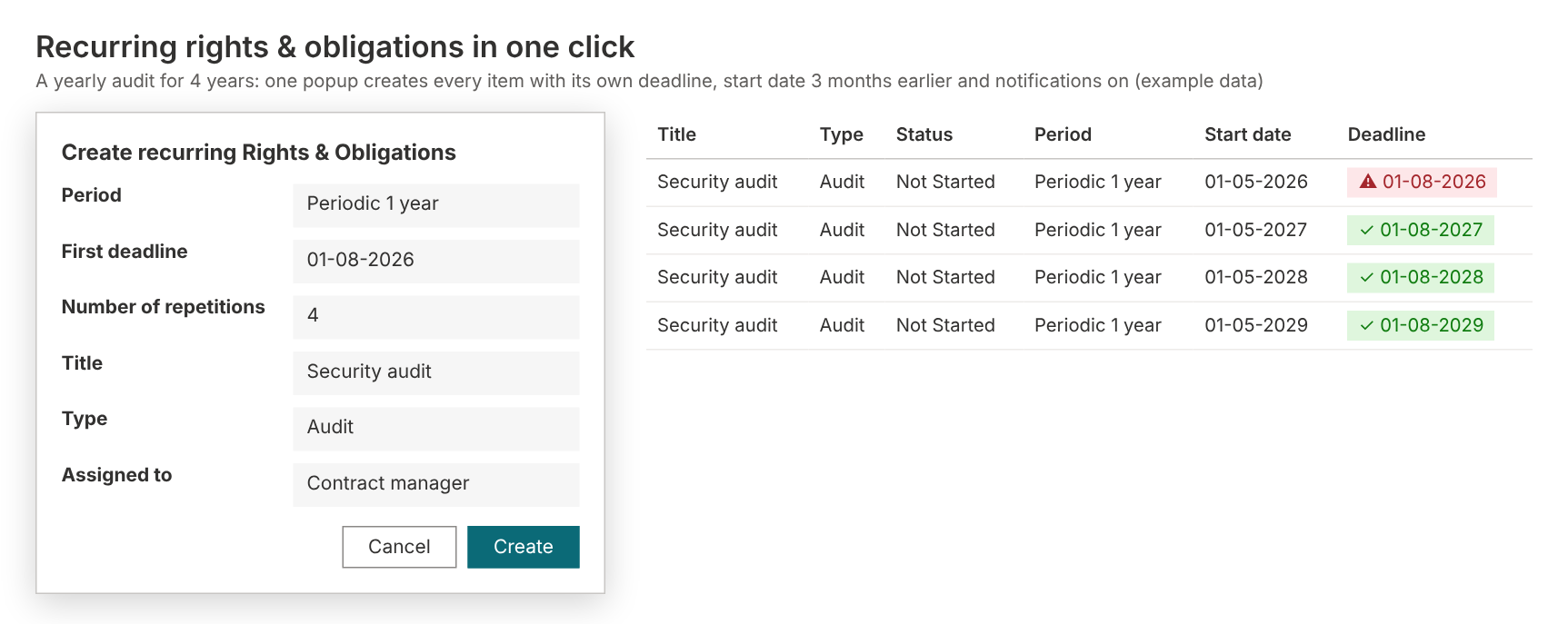
Contracts contain promises: yearly audits, penetration tests, reports, price indexations. These are registered as rights & obligations with a person, a deadline and a status. Because many of them repeat, we added a Create recurring Rights & Obligations button: choose the period, the first deadline and the number of repetitions, and every item is created with its own deadline, a start date three months earlier and notifications switched on. A second button creates an indexation obligation straight from a contractual value.
Relations between contracts
Large customers often have a framework agreement with subcontracts for individual locations. In the relations list users link contracts as framework agreement, subcontract, replaces or related to. The debtor and products of the linked contract are shown in the relation list, and a separate overview shows all contractual relations across the division – of course within the user’s permissions.
Then came purchasing: same foundation, different questions
Once sales contract management was running, the purchasing team wanted the same for supplier contracts. We could reuse a lot – the structure, permissions, notifications, search lists, export – but purchasing asks different questions. The biggest change is the supplier: not just a name on a contract, but a record of its own.
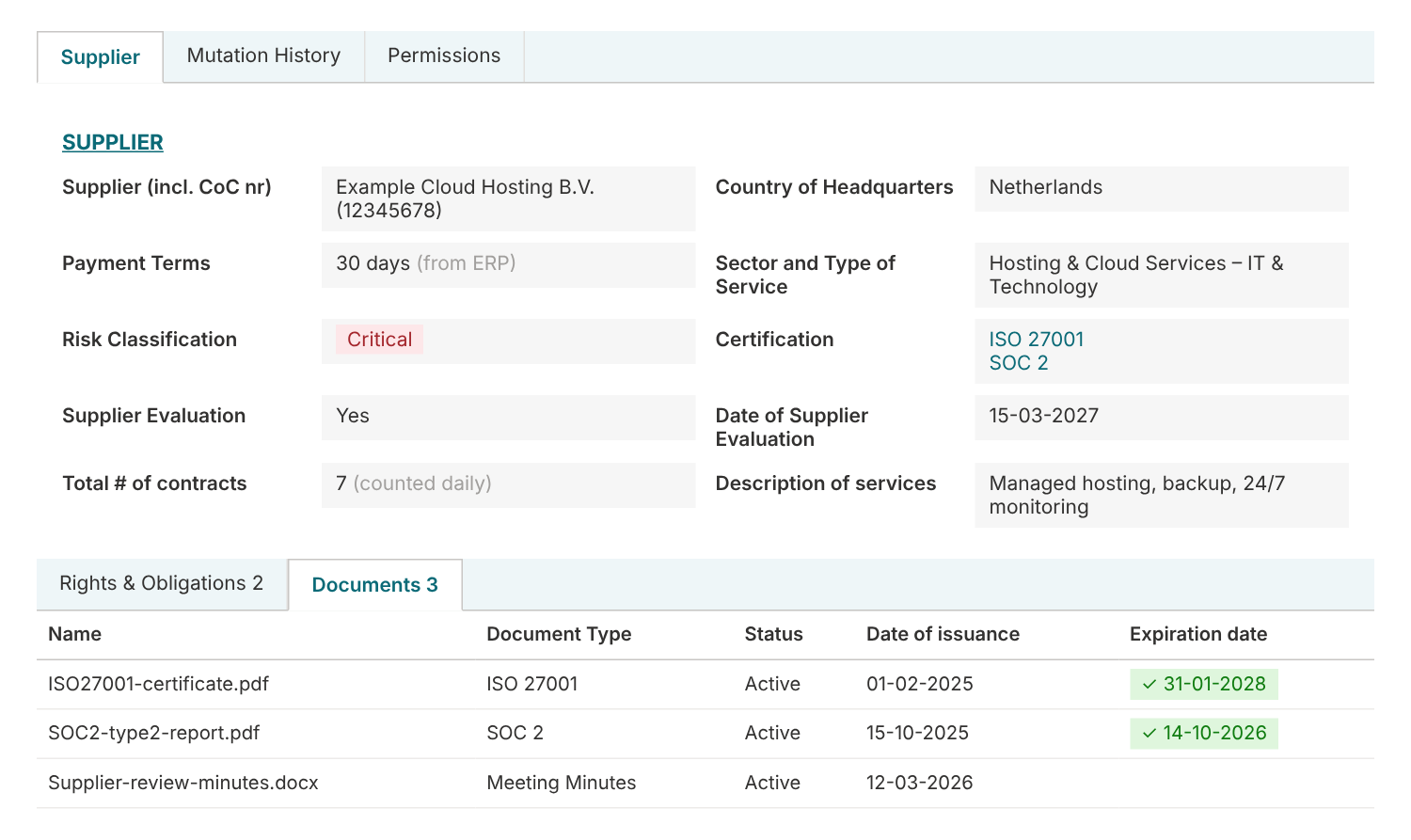
- Suppliers come from the ERP every day, including chamber of commerce number and payment terms, so nobody creates duplicates.
- Each supplier gets a risk classification (critical, important, normal), its certifications (such as ISO 27001, ISO 9001, SOC 2, ISAE 3402) and a supplier evaluation with date and remarks.
- Supplier documents such as certificates get an expiry date, so an expired ISO certificate shows up in red.
- A daily job counts the number of contracts per supplier – useful when you negotiate.
- Three months before the evaluation date the application creates a task and sends a notification.
The purchase contract form is smarter about the type of purchase. The contract type follows from the purchase category: most categories are a normal agreement, rent of business premises is a pledge agreement with its own address and rent increase fields, and software becomes a software licence with licence type (SaaS, on-premise, desktop), quantity and personal licences. Open source software hides everything that does not apply, such as duration, signing and values. And a purchase contract can be linked to the sales contract it supports, across both apps.
Sales vs purchase contract management: the differences
Here is an overview of what we built in each app.
| Topic | Sales contracts | Purchase contracts |
|---|---|---|
| Counterparty | Customer (debtor) from the ERP, filtered on the division where the contract is made | Supplier with its own supplier form: risk classification, certifications, evaluation, payment terms and number of contracts |
| Structure | Divisions with business lines underneath | Divisions plus a central “Core” environment for group-wide purchasing |
| Contract type | One contract form for all business lines | Contract type is derived from the purchase category: agreement, pledge (rent) agreement or software licence |
| Smart form rules | Fields depend on renewal type and contract status | Extra rules: open source software hides duration, values and signing; pay-as-you-go hides indexation; software licences get licence type, quantity and personal licences |
| Renewal types | Fixed end date, silent renewal, silent renewal with a maximum number of renewals | Fixed end date, silent renewal and one-off purchases |
| Notice periods | Customer and own organisation | Supplier and own organisation |
| Specific agreements | Intellectual property, liability, penalty and change-of-control clauses, agreed standards, special price and invoice agreements | SLA and KPI agreements, termination provisions, terms of use / EULA, cost allocation, and the supplier’s certifications shown on the contract |
| Contractual values | Price carrier (students, users, fixed fee…), period, indexation basis, special or variable consideration | Same model plus expected units, billing period and – for rent – the annual rent increase |
| Rights & obligations | Recurring obligations, obligations from agreed standards and from indexation | Recurring obligations on contract and supplier level, plus an automatic task for every supplier evaluation |
| Documents | Contract documents with signing date and status | Contract documents plus supplier documents such as ISO 27001 and SOC 2 certificates with expiry date |
| Relations | Framework agreements and subcontracts, locations of a customer | Related purchase contracts and a link to the related sales contract |
| Notifications | Cancellation deadlines (silent renewal), end dates, obligations | Same, plus supplier evaluations three months in advance |
Notifications that match the contract
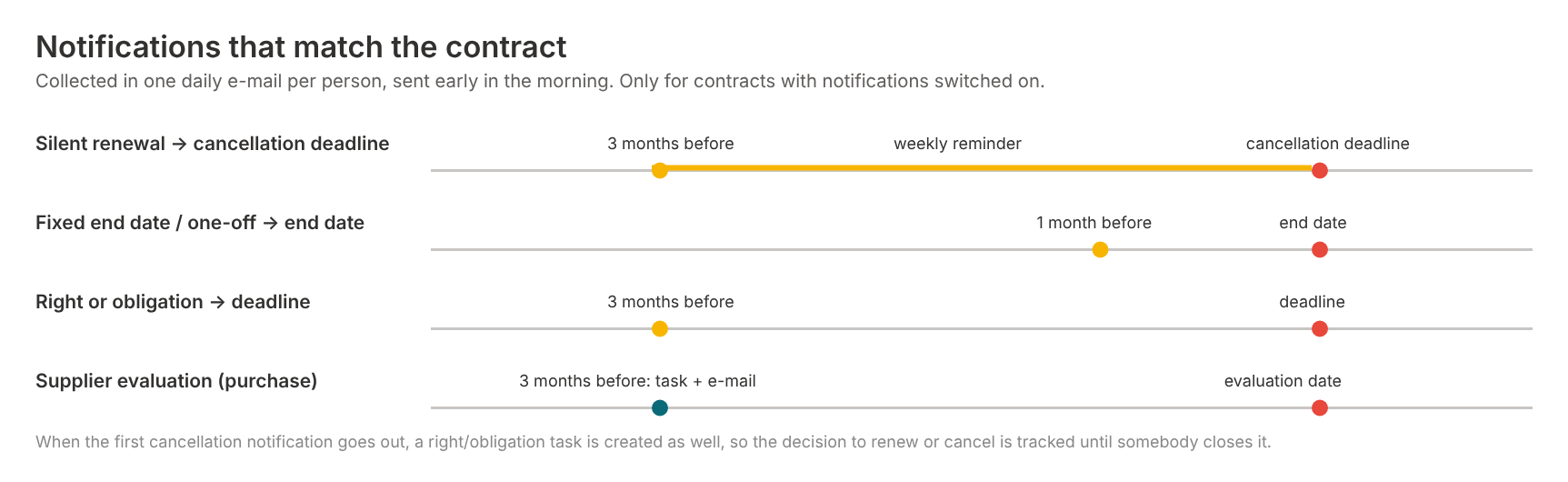
Nobody wants twenty e-mails a day. Notifications are therefore collected in one daily e-mail per person, sent early in the morning, and only for contracts where notifications are switched on. The rules follow the contract:
- Silent renewal: three months before the cancellation deadline, with a weekly reminder until it is handled.
- Fixed end date or one-off: one month before the end date.
- Rights & obligations: three months before the deadline, until the status is completed.
- Supplier evaluation (purchase): three months before the evaluation date, with a task.
When the first cancellation notification goes out, a task is created as well, so the decision to renew or cancel is tracked until somebody closes it.
Data in, data out
Contract management does not live on an island. Master data comes from the ERP every night. For the initial load and for bulk updates we delivered an Excel template with exactly the same columns as the contract form, plus lookup columns so input errors are hardly possible. And an export delivers contracts, values, rights & obligations and document metadata to Excel, ready for the customer’s data warehouse and management reporting.
How we worked: small phases, close to the users
We did not build this in one big project. The sales app started with the core – structure, permissions, contract form, ERP import and notifications – and then grew in short phases driven by the people using it every day: recurring obligations, the renewal types, relations and locations, import and export, extra fields and fine-tuning. Every phase had a clear scope and was tested by the customer’s key users before it went to production. The purchase app was designed in the same shared workbook – field by field, with type, default, mandatory rule and visibility rule – and reused everything that already worked for sales.
Want to know more about that approach? Read From customer needs to tailor-made contract management in SharePoint.
What management gets out of it
- Grip on deadlines – no more contracts that renew silently because nobody saw the date.
- Insight into value – all contractual values, recurring and one-off, filterable across the organisation.
- Supplier risk under control – certifications, evaluations and critical suppliers in one view.
- Confidentiality per division – everyone sees exactly what they are allowed to see.
- One platform – sales and purchase contracts in your own Microsoft 365 environment, with the same way of working.
Frequently asked questions about SharePoint contract management
Can you do contract management in SharePoint?
Yes. SharePoint Online is a secure place for contracts, but on its own it has no contract register, notice period calculation, reminders or contractual values. Shareflex Contract adds exactly that on top of SharePoint, in your own Microsoft 365 tenant.
What is the difference between sales and purchase contract management?
Sales contracts are about customers, revenue, price indexation and what you promised. Purchase contracts are about suppliers, cost, risk and compliance: is the supplier certified, is the evaluation due, does the software licence still match the number of users? That is why we built two apps with their own forms on one shared foundation.
Can Shareflex Contract work with our ERP?
Yes. Customers, suppliers, cost centres and products are imported daily from the ERP into SharePoint lists, so users pick them from a list instead of typing them. Contract data can also be exported to Excel or a data warehouse.
How do we keep contracts confidential per department?
Permissions are set per division and business line. Users only find contracts they are allowed to read, also in the search lists across all contracts.
Will we be reminded before a contract renews automatically?
Yes. For silent renewals the cancellation deadline is calculated from the start date, minimum duration, renewal period and notice period. Three months before that date the responsible people get a reminder, weekly, until the decision has been made.
Your sales and purchase contracts in SharePoint?
Do you want contract management that follows your organisation, for the contracts you sell and the contracts you buy? Have a look at Shareflex Contract for SharePoint and Microsoft 365, read how we built a safe Copy Contract feature or get in touch.
