
Shareflex is moving to a new technical foundation: the New Core Infrastructure. For users little changes on the surface, but under the hood the way Shareflex reacts to changes in SharePoint is completely renewed. Portal Systems has announced that the old mechanism – SharePoint remote event receivers – will no longer be available from July 2027. Every Shareflex customer will therefore need to upgrade. In this article we explain what changes, what it means for your customizing, and how the upgrade works.
What changes?
- Events come from Shareflex, not from SharePoint. In the legacy setup a remote event receiver in SharePoint told Shareflex that an item was added or changed. In the new infrastructure events come from Shareflex Forms, the Shareflex backend API and SharePoint webhooks, and are processed by event subscriptions inside Shareflex.
- Scripts and configuration are separated. Business logic lives in backend scripts; what triggers it lives in event subscriptions. Both can be managed independently.
- Core and custom are separated. Standard (core) scripts are versioned centrally by the vendor; your custom scripts stay in your own SharePoint and are merged at runtime. Updates of the standard no longer collide with your customizing.
- A management cockpit. A new Core UI shows scripts, event subscriptions and timer events – including live data such as the last executions of scheduled jobs.
What does it mean for your customizing?
Most customizing can be migrated as-is, but there are a few breaking changes to check:
- Event handling for changes made outside Shareflex Forms (for example directly in a SharePoint list) is only possible in a limited, asynchronous way via webhooks.
- “Item deleting” events outside the Shareflex UI are no longer available – a permission concept for deletions is the alternative.
- Updates made via plain REST calls no longer trigger business logic automatically; scripts trigger events explicitly instead.
- Older provisioning formats are not supported anymore; deployment runs on Shareflex Provisioning JS (ProvJS).
What do you gain?
- Faster, event-driven processing instead of many timer jobs that poll for changes.
- Business logic written once and triggered from forms, scripts or the backend API.
- Integrations that trigger events directly, for example from an ERP or another system.
- Cleaner updates, because standard and customizing no longer live in the same files.
How the upgrade works
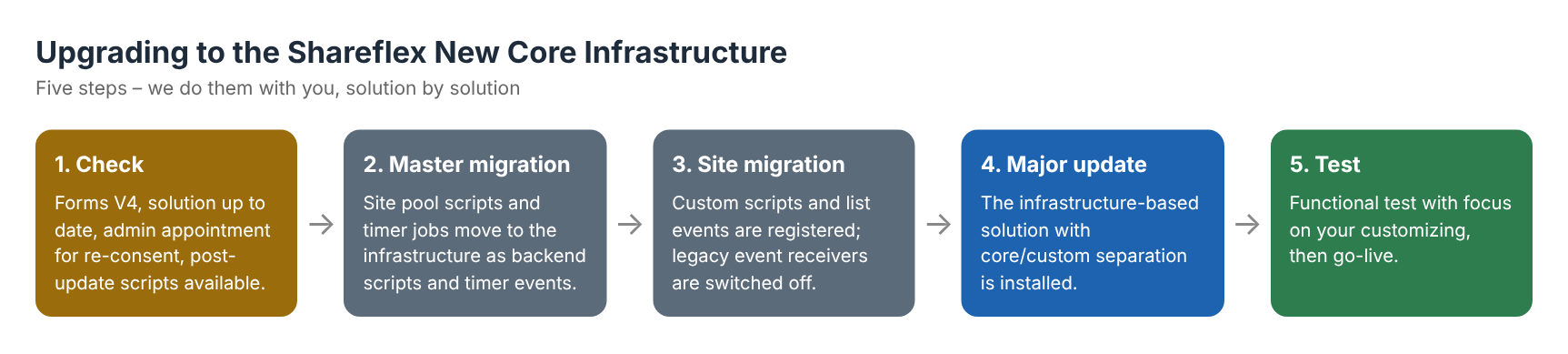
The upgrade is done per solution and per site collection, with scripts that first document the current state, then run a dry run, and only then make changes. The prerequisites: Shareflex Forms V4, an up-to-date solution, and an appointment with your Microsoft 365 administrator, because the Shareflex app needs to be consented again. After the migration we test the solution with a focus on your own customizing before it goes live.
How Lialis helps
As a Shareflex partner we implement and customize Shareflex solutions, and we develop our solutions in VS Code with provisioning scripts – exactly the way the new infrastructure works (see Shareflex development with VS Code and provisioning). We take care of the inventory of your customizing, the migration, the testing and the communication with Portal Systems. For standard solutions this is usually a fixed-price package; heavily customized or older environments get an individual estimate.
Frequently asked questions
Do all Shareflex customers have to upgrade to the New Core Infrastructure?
Yes. Portal Systems has announced that the legacy remote event receivers will no longer be available from July 2027, so every Shareflex Online environment needs to be migrated before then.
Will users notice the upgrade?
Hardly. The forms and solutions stay the same. The changes are in how events, scripts and configuration are processed in the background.
Does my customizing still work after the upgrade?
Most customizing can be migrated. A few patterns – such as logic on deletions outside the Shareflex UI or events from direct REST updates – need an alternative. That is why we check your customizing before the migration.
What do we need to arrange ourselves?
An appointment with your Microsoft 365 administrator for the renewed consent of the Shareflex app. We organise the rest.
Plan your upgrade in time
Do not wait until spring 2027. Contact us to plan the upgrade of your Shareflex Contract, document control or document management environment.
