
Employees working in Microsoft 365 with Shareflex now have several AI tools at hand: the Shareflex AI Studio, Microsoft 365 Copilot and the Shareflex Copilot. The most common question we hear: which one do I use when? The answer is simpler than it seems. AI works like a toolbox – you do not use a hammer to drive in a screw. Not the tool but the question decides. Three questions are enough.
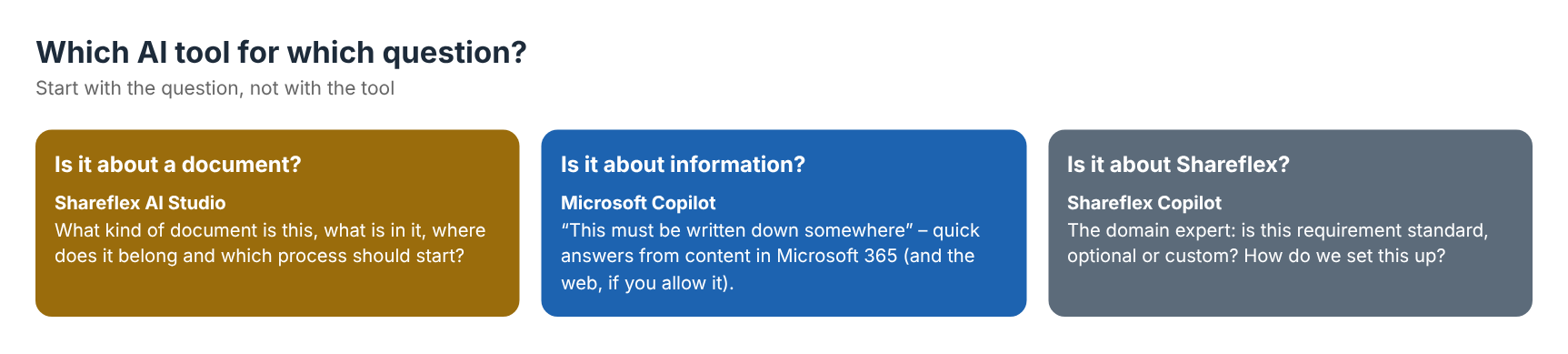
1. Is it about a document? → Shareflex AI Studio
The Shareflex AI Studio comes in when you want to know: what kind of document is this, what is in it, and how can we automate the process around it? It does not matter whether it is a contract, an order, a delivery note or an invoice, a Word file, a PDF or a scan.
- Extraction and classification – metadata such as parties, dates, amounts or document type are read from the document and filled in automatically, so documents are filed consistently without manual typing.
- Automation – based on the content, a process starts: for example check for duplicates, create the contract file if it does not exist yet, store the document as a new version and approve it automatically when the rules allow it.
- Searchable PDFs – scans are converted to text-searchable PDFs.
Under the hood the AI Studio uses Azure Document Intelligence (text, tables, barcodes and query fields) and Azure OpenAI (metadata extraction and analysis) in your own Azure environment. The AI Studio is not a chat tool – it is a productivity tool for document-centric processes.
2. Is it about information? → Microsoft Copilot
Microsoft Copilot is the tool for the moment you think: “this must be written down somewhere, I need a quick answer.” Which security policy applies? What do our compliance documents say about this? Copilot answers based on the content available to you in your Microsoft 365 tenant, optionally combined with a web search. You decide whether you ask broadly or give a specific context, such as one site or one document.
The better your documents are structured – with metadata, versions and permissions – the better Copilot’s answers. That is why structured document management in SharePoint and AI belong together.
3. Is it about Shareflex? → Shareflex Copilot
The Shareflex Copilot is the domain expert. Everything that is Shareflex-specific belongs here: does this customer requirement fit Shareflex? Is it standard, optional or custom work? How do we classify this scenario? It is especially strong for product and requirement questions – without searching through all the documentation yourself.
In practice: combine them
A typical day: a new supplier contract arrives by e-mail. The AI Studio reads it, fills in the metadata and files it in the right contract file. A colleague later asks Copilot which contracts mention a certain liability clause. And the contract manager asks the Shareflex Copilot how to set up a new approval step. Three tools, three questions, one consistent document base.
And when standard AI is not enough: AI tailored to your process
Standard AI tools are a good start, but every organisation’s contracts and documents are different. Which clauses matter, which fields must be filled, which deviations are a risk – that is specific to your business. That is why Lialis also builds AI tailored to your own process, on top of Shareflex and in your own Azure environment:
- AI PDF scan – drop a signed contract PDF in a library; the metadata is extracted, matched to your master data and ready for review.
- Contract AI with Azure OpenAI and Azure AI Search – ask questions about your contracts by meaning instead of keywords, with links to the contract record and source document.
- AI contract analysis – find penalty clauses, risky contracts or NDAs and get an explanation, across your whole portfolio.
- AI document finder for quality documents – users ask in their own words, even with typos, and find the valid procedure.
Our advice: choose the tool by the question – and when the question is specific to your business, choose AI that is built for it.
Frequently asked questions
What is the Shareflex AI Studio?
The Shareflex AI Studio is the AI layer of Shareflex for document-centric processes. It extracts metadata from documents, classifies them, creates searchable PDFs and starts automated steps such as duplicate checks and approvals, using Azure AI services in your own tenant.
Is the Shareflex AI Studio the same as Microsoft Copilot?
No. Copilot answers questions about information in Microsoft 365. The AI Studio processes documents: it reads, classifies and files them and starts processes. They complement each other.
Does the AI Studio work with scanned documents?
Yes. Word files, PDFs and scans are supported; scans can also be converted to text-searchable PDFs.
Where is our data processed?
The AI Studio uses Azure Document Intelligence and Azure OpenAI services that you configure in your own Azure environment.
Can Lialis build AI tailored to our own contracts or documents?
Yes. Next to the standard Shareflex AI functions we build AI solutions on top of Shareflex in your own Azure environment – such as AI PDF scanning, contract analysis and AI search – tuned to your document types, master data and rules.
Want to see AI in your document processes?
We show the AI Studio with your own contracts or quality documents. See contract management software for SharePoint, document control software for SharePoint or read our AI PDF scan for contracts.
